It's really simple to enter: if you have a phonic product lying around (more than likely it's being put to good use, though), just pick up your camera and record a short tutorial or testimonial (or something in that vein) and submit it to the Phonic Shout Out contest.
If you do, you could win a Phonic Summit Digital Mixer (there's one for each of the top 3 videos).
You really have nothing to lose by submitting something, right?
Submit your entry now to www.phonic.com/shoutout
And by "NOW" I mean from September 2nd onwards.


Tuesday, 31 August 2010

Sunday, 22 August 2010
Summit Concept Art Part 3
Just thought I'd upload another concept art piece for the Phonic Summit. At this point it was called "Intuitive 32" - at least according to the design. This design is a lot more compact than what we ended up with, but didn't work on an engineering level and was a bit too crammed for the most part.

There are a few functions here Phonic employees wish they could have retained for the final version, but the way they ended up developing the unit didn't leave much room for any of the bells and whistles. We'll see for the next version though.
Friday, 20 August 2010
Summit System Restore Software
There are instructions for this in the user's manual, but since it's a printed book it was a little difficult to insert a hot-link to the download file. So the link below is to compensate for that. Click the link below to download the Summit Restore File.
Summit Restore Software
This is different to the firmware updates in that it installs the Summit's operating system from scratch. This is done during the booting process (check the user's manual for instructions, it's all in there). If a firmware update fails, it may be necessary to perform the system restore from scratch before trying the firmware update again.
September 2010 Update: The restore method detailed in the user manual has been altered slightly since its publication. The Summit Restore file listed above will also include release notes that have new installation instructions included.
Summit Restore Software
This is different to the firmware updates in that it installs the Summit's operating system from scratch. This is done during the booting process (check the user's manual for instructions, it's all in there). If a firmware update fails, it may be necessary to perform the system restore from scratch before trying the firmware update again.
September 2010 Update: The restore method detailed in the user manual has been altered slightly since its publication. The Summit Restore file listed above will also include release notes that have new installation instructions included.
Wednesday, 18 August 2010
Firmware 1.10.13 Out Now!
The Summit firmware has been updated. The new firmware, in addition to the start-up menu previously mentioned on this blog, has a new DSP program for better performance. Not too shabby right?
Download the latest firmware now!
Download the latest firmware now!
Tuesday, 17 August 2010
Settings Recall Function
There's been a bit of firmware talk lately (both in the office and on this blog), and there's one new function that hasn't been mentioned, which may be of interest. With a new firmware update - coming soon, so this is a sneak peak - users will be given the option to load all of their previous settings (or not), directly after the initial restart. Take a look at the screen below.

Also, I haven't given you a look at this yet, but check out the 4 dynamic processor indicators on the current firmware version.
 Basically those Gate, Expander, Compressor and Limiter indicators at the bottom there will light up any of those colors depending on the status of the dynamic process (that's already been discussed, so I won't bore you with details again!).

Also, I haven't given you a look at this yet, but check out the 4 dynamic processor indicators on the current firmware version.

Thursday, 12 August 2010
SD Card Reader Info
I just have a quick note about the Summit's SD card reader. The original firmware of the Summit has a slight bug which makes it only compatible with normal SD cards and not SDHC (below) or SD mini cards.
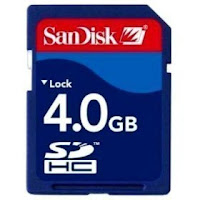 The problem is fixed with the updated firmware, of course, but you will probably need a normal, original, plain-old-boring SD card to update the firmware before you can use that fancy-shmancy SDHC or SD mini (with an adapter, of course).
A few users have already emailed Phonic about this problem, but I hope the few who are a little too shy to email the company can get the info here.

A few users have already emailed Phonic about this problem, but I hope the few who are a little too shy to email the company can get the info here.
Wednesday, 11 August 2010
Another Summit Firmware Release!
Almost a week to the day, Phonic is uploading another brand new Firmware release. It's not the biggest of updates, but it's interesting none-the-less.
Basically the update is a few new indicators in the METER and FADERS menus. If you're in the channel tab, you'll be able to see 4 new indicators for each channel. There's one for each of the dynamic processors: Expander, Gate, Compressor and Limiter. We've included these just to give you a little idea what's going on.
So these indicators may be any one of three colors. Yellow means that the dynamic process is turned off, and blue means it's on. Red, on the otherhand, means the dynamic process has been tripped and is currently active.
We also updated the firmware so your settings will autosave approximately every 5 minutes, but that's not that big of a deal - particularly since you can just use the scenes function to save any time you like!
Download link hasn't changed. Get it here!
Basically the update is a few new indicators in the METER and FADERS menus. If you're in the channel tab, you'll be able to see 4 new indicators for each channel. There's one for each of the dynamic processors: Expander, Gate, Compressor and Limiter. We've included these just to give you a little idea what's going on.
So these indicators may be any one of three colors. Yellow means that the dynamic process is turned off, and blue means it's on. Red, on the otherhand, means the dynamic process has been tripped and is currently active.
We also updated the firmware so your settings will autosave approximately every 5 minutes, but that's not that big of a deal - particularly since you can just use the scenes function to save any time you like!
Download link hasn't changed. Get it here!
Subscribe to:
Posts (Atom)